How to Log Barbell, Dumbbell, and Machine Weights
Learn whether to log one dumbbell or both, how to count the bar and plates, and how to record machine settings, added weight, and assistance clearly.
For a barbell lift, log the bar plus the plates on both sides. For dumbbells, state whether your entry means one dumbbell or the pair. For machines, record the selected setting and which machine you used. Keep that meaning consistent every time you log the exercise.
An entry such as “20 kg × 8” leaves room for confusion. It could mean a 20 kg barbell, a 20 kg dumbbell in each hand, or two 10 kg dumbbells. A short label settles the question before it becomes a misleading comparison in your history.
Use your app's stated convention when it provides one. Otherwise, the methods below give you a clear starting point for a notebook, spreadsheet, or workout tracker. All example loads and rep counts illustrate notation; they are not training targets.
Barbells: include the bar and both sides
For a free barbell, record the total load you assembled: the bar, all the plates on the left, and all the plates on the right. Include the known weight of weighted collars when you use them.
Count both sides
Kilogram example: 20 kg bar + 10 kg left + 10 kg right = 40 kg
Pound example: 45 lb bar + 25 lb left + 25 lb right = 95 lb
These are separate examples without weighted collars, not equivalent loads in different units. Enter the unit shown on your equipment.
Check the bar's marking or ask the gym instead of assuming every bar weighs 20 kg. For example, Eleiko's 15 kg weightlifting training bar has a different starting weight. If you use a different bar, recalculate the total before copying the previous entry.
A fixed-weight barbell already carries a marked weight. Record that number; do not add an imaginary empty bar to it. Treat a Smith machine as its own machine entry rather than assuming its bar has the same starting resistance as a free barbell.
Use a barbell calculator to check your total
The TrrackFit barbell calculator works in your browser with kilograms or pounds. Choose your bar's weight, then use the mode that matches your question:
- Target weight: enter the total you want, including the bar. The calculator shows which plates go on each side. Set the available plate sizes and quantities to match your equipment. If the target cannot be made, check the achievable total shown before loading or logging it.
- Add plates: select the plates you have loaded to calculate the total. Each tap adds one plate to each side, so tap a 10 kg plate once to add 20 kg across the whole bar.
For example, the target-mode screenshot below uses a 15 kg bar and 36.25 kg per side: 25 + 10 + 1.25 kg. The result is 15 + 2 × 36.25 = 87.5 kg total. Log 87.5 kg, rather than the per-side plate weight. This is a calculation example, not a suggested training load.
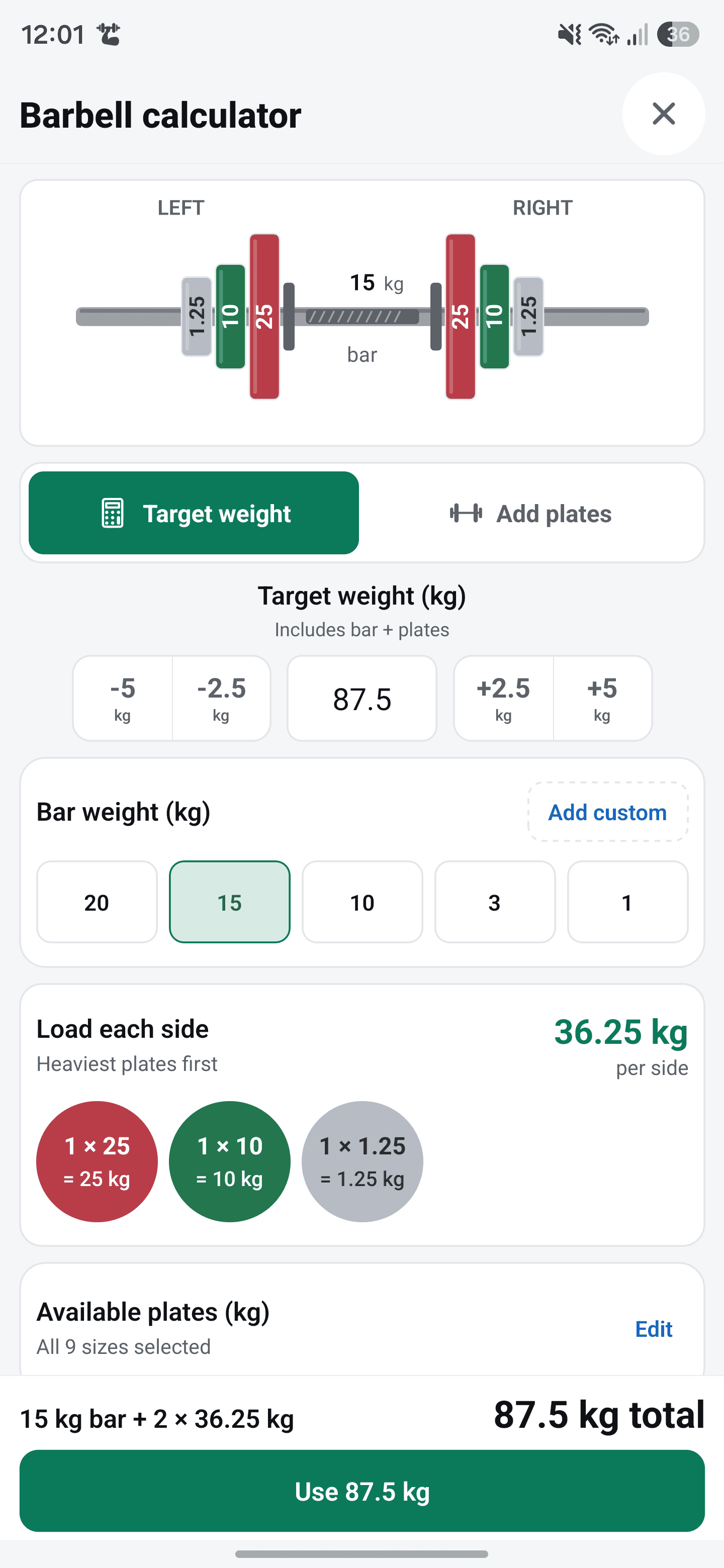
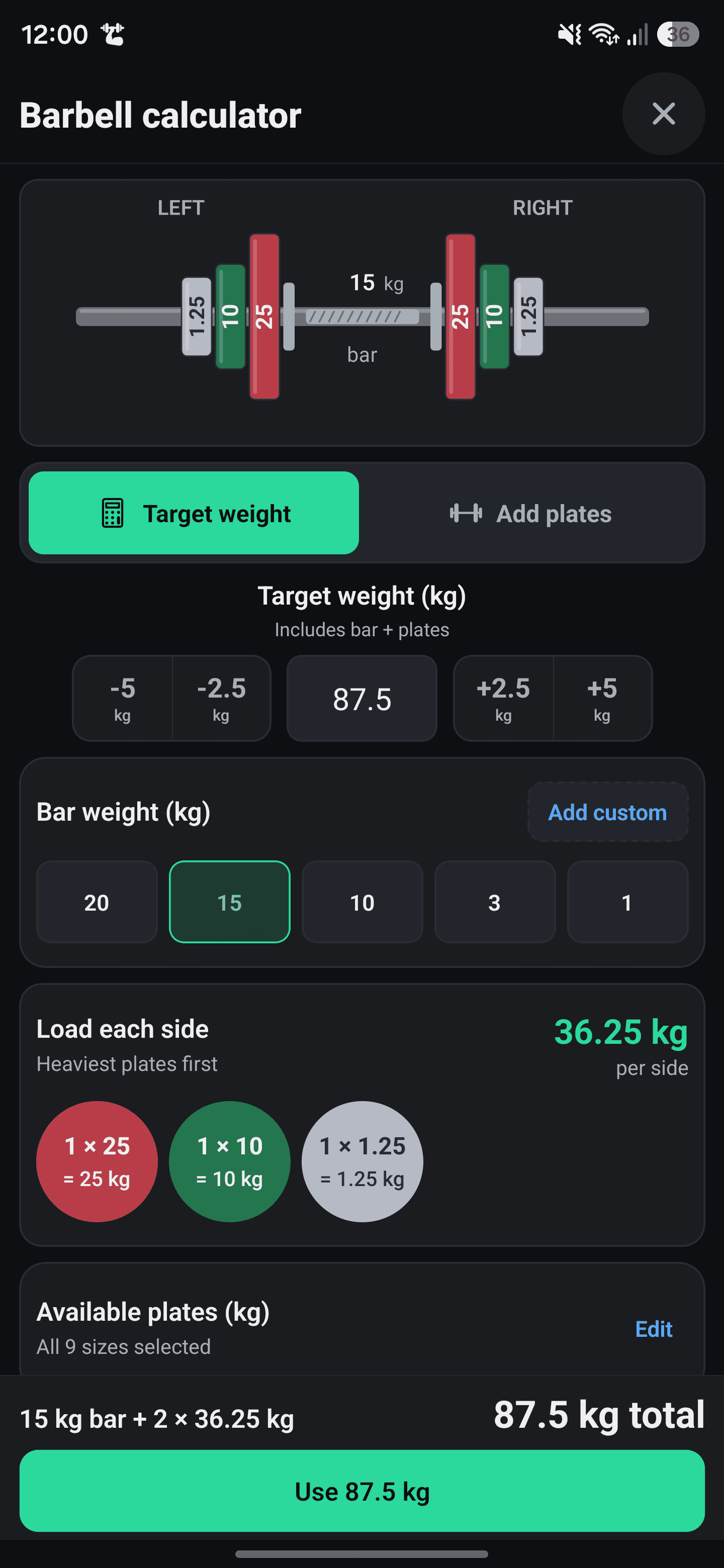
In the mobile app, open a workout and tap the barbell icon beside the weight input for an exercise with barbell or EZ-bar equipment. Choose the bar and use either mode, then tap Use [weight] to fill the workout's weight field. This fills in the load; you still enter the completed reps and log the set.
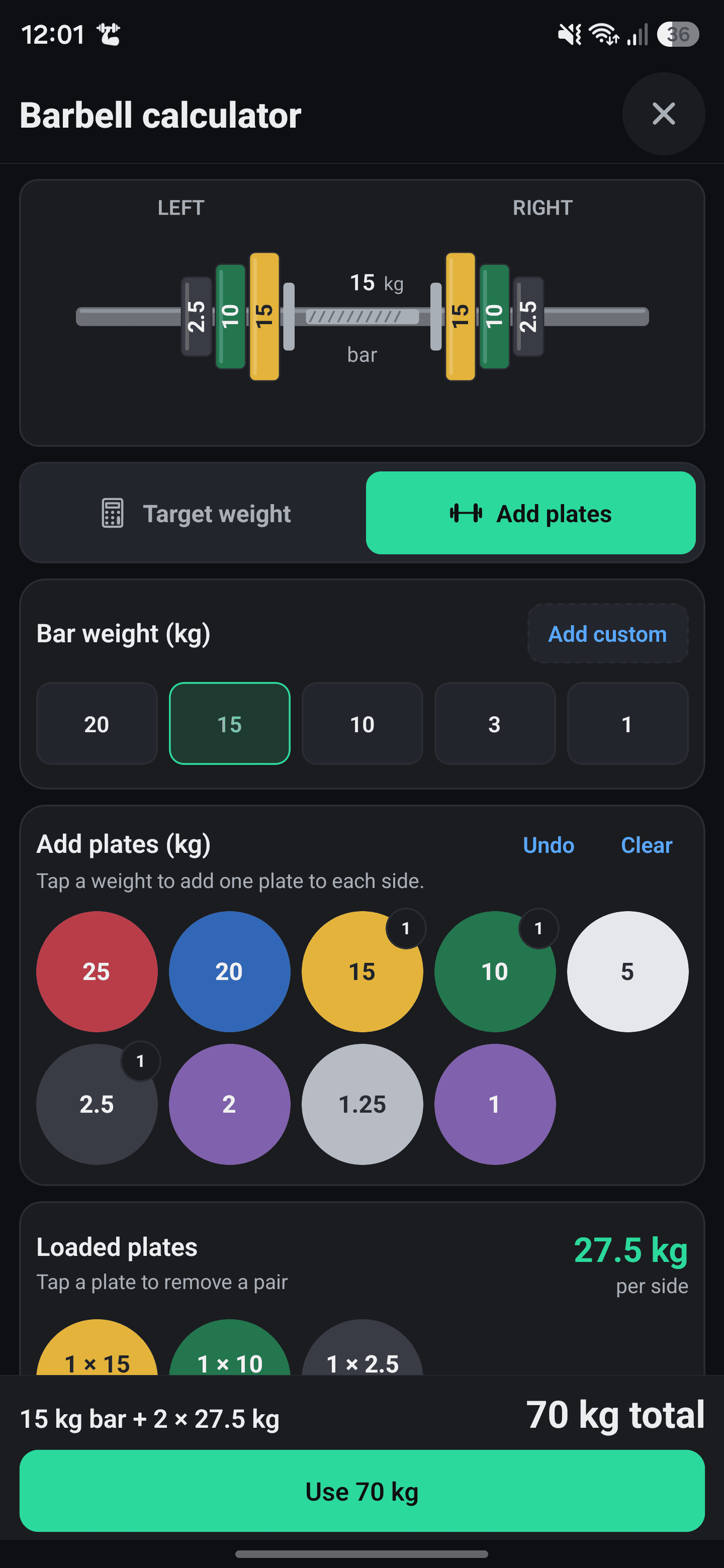
Check that the selected bar, plates, and units match the equipment in front of you. These examples exclude weighted collars; account for their known weight separately if you use them.
Dumbbells: log one or both, and label the choice
If your tracker does not specify otherwise, weight per dumbbell is a convenient convention: the number you enter matches the number on the dumbbell you pick up. With two 20 kg dumbbells, you would enter 20 kg and identify the convention as “per dumbbell.”
A combined-weight convention also works if it is clearly labeled. The same pair would be 40 kg total. Keep using that convention for the same exercise so your history remains readable.
- Two dumbbells moving together: record the reps you complete. Eight reps with both arms moving together is eight reps, not sixteen.
- One dumbbell held in both hands: record that single dumbbell's weight. A 20 kg goblet-squat dumbbell stays 20 kg.
- Adjustable dumbbells: use the assembled weight of each dumbbell, following its manufacturer's markings; do not mix plate-only entries with whole-dumbbell entries.
If your tracker calculates volume as entered weight × reps, a per-dumbbell entry and a pair-total entry will produce different totals. Compare records that use the same convention. Do not change the entry just to make a volume number larger.
One side at a time: make the rep count clear
For exercises performed one arm or leg at a time, define what the rep field means as well as the weight field. “One-arm row: 20 kg × 8 per side” tells you more than “20 × 16.”
In a personal log, one workable convention is to record a set after both sides are complete and enter reps per side. If you complete eight reps on each side, that entry means eight left and eight right. Alternatively, log each side separately and identify it. Follow the convention your program or tracker uses, and keep it consistent.
If the sides differ, preserve the difference: “left 8, right 7” is more useful than recording eight for both. Use a side-specific entry or a note instead of an average. For alternating movements, label whether you count each side or all repetitions together.
Machines: record the setting and the equipment
On a machine with a weight stack, record the selected weight shown on the machine and the unit. Add enough equipment detail to find the same setup again: the model or station, attachment, and relevant seat or cable position. If you use two independent stacks, say whether the entry is per stack or combined.
Machine numbers need their equipment context. Life Fitness specifies a 4:1 resistance ratio for one Dual Adjustable Pulley and a 2:1 ratio for its Axiom model. Those specifications are a reason to keep separate records for different machines; they do not give you a universal formula for converting every machine's label into a free-weight equivalent.
If a stack is numbered only by position, write “setting 6” rather than calling it 6 kg. In a tracker that requires a weight value, check the machine's weight chart or ask gym staff before entering a kilogram or pound value.
For a machine loaded with plates, a clear convention is total plates added, with a “plates only” label. For example, 20 kg on each side becomes “40 kg plates only.” If you include a manufacturer-specified starting resistance, record that choice too. Keep entries that include it separate from entries that do not; avoid guessing a sled or lever's starting resistance.
Keep added weight and assistance separate
Bodyweight exercises introduce two different meanings for the weight field: weight you add and assistance you receive. Keep them distinct.
- Unweighted exercise: record reps, or duration when that is how the exercise is tracked. A reps-only entry does not need an invented weight.
- Added weight: “pull-up, +10 kg × 5” means 10 kg added to your bodyweight. If the field says Added weight, enter 10 kg, not your bodyweight plus 10.
- Machine assistance: “assisted pull-up, 25 kg assistance × 6” records the assistance setting. In a field labeled Assistance, enter the positive setting; let the tracker handle its display and calculations.
A smaller assistance setting means you selected less assistance on that machine. It is not the same kind of change as reducing the load on a barbell. Keep weighted, unweighted, and assisted variants identifiable when reviewing their histories.
For band-assisted work, record the band and setup rather than inventing one precise kilogram value for the session.
Worked example: a weight jump caused by notation
Consider three fictional sessions of the same dumbbell press. In session B, the person switches to recording the pair's total weight, then switches back in C.
| Session | Dumbbells used | Recorded entry | Meaning of weight | Entry per dumbbell |
|---|---|---|---|---|
| A | Two 20 kg dumbbells | 20 kg × 8 | One dumbbell | 20 kg × 8 |
| B | Two 20 kg dumbbells | 40 kg × 8 | The pair | 20 kg × 8 |
| C | Two 22 kg dumbbells | 22 kg × 8 | One dumbbell | 22 kg × 8 |
The uncorrected entries look like a jump from 20 to 40 kg followed by a drop to 22 kg. The equipment tells a different story: A and B used the same weights; C used 2 kg more per dumbbell.
Because the original convention is known, B can be expressed as 40 ÷ 2 = 20 kg per dumbbell. After that correction, all three entries answer the same question. The arithmetic does not establish a strength gain by itself; it makes the records comparable enough to begin reviewing them.
What if you have been logging differently?
You do not need to discard an old log because you chose a different convention. What matters is whether you can identify what each entry meant.
- Choose the convention for future entries. Write it beside the exercise name or in a note, such as “kg per dumbbell; reps per side.”
- Correct entries only when you know their meaning. Divide a known pair-total entry by two to express it per equal-weight dumbbell. Do not assume every unusually high entry is a logging mistake.
- Mark uncertain history. If you cannot reconstruct the old convention, keep those records and note the date from which entries are consistent.
- Check the unit before copying a previous set. Converting pounds to kilograms changes the number; relabeling the same number does not convert it.
If you change gyms or equipment, identify the new setup before interpreting a jump or dip in the log.
Log your weights in TrrackFit
TrrackFit shows previous sets beside the current workout's entries. Before copying a number, check that you are using the same exercise, equipment, unit, and weight convention.
When creating a custom exercise, choose the tracking method that matches what you need to record:
- Weight + reps for an external load and rep count.
- Reps only for an exercise you record without a weight.
- Weighted bodyweight for added weight and reps.
- Assisted bodyweight for assistance weight and reps.
The workout input is labeled Weight, Added weight, or Assistance according to the exercise. Follow that label rather than adding bodyweight into every entry yourself.
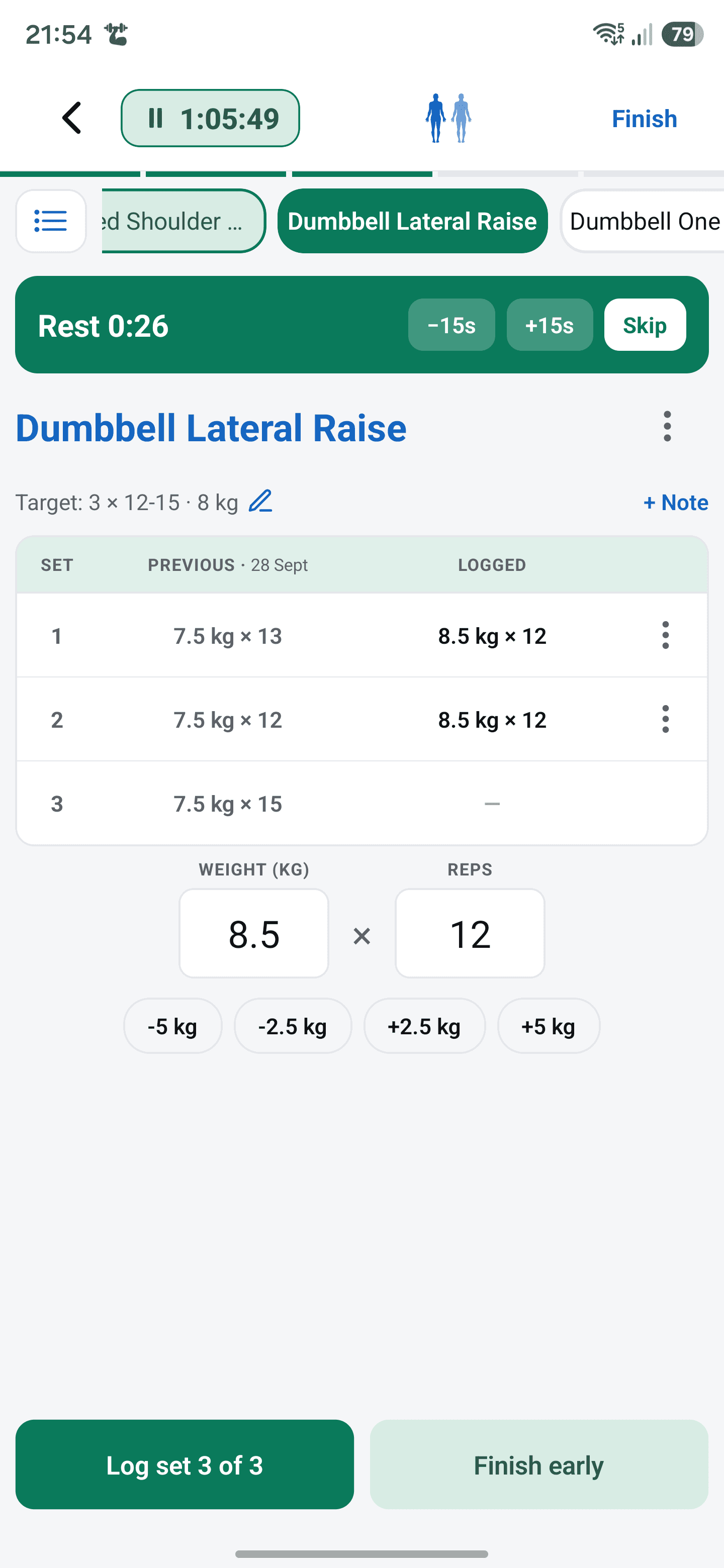
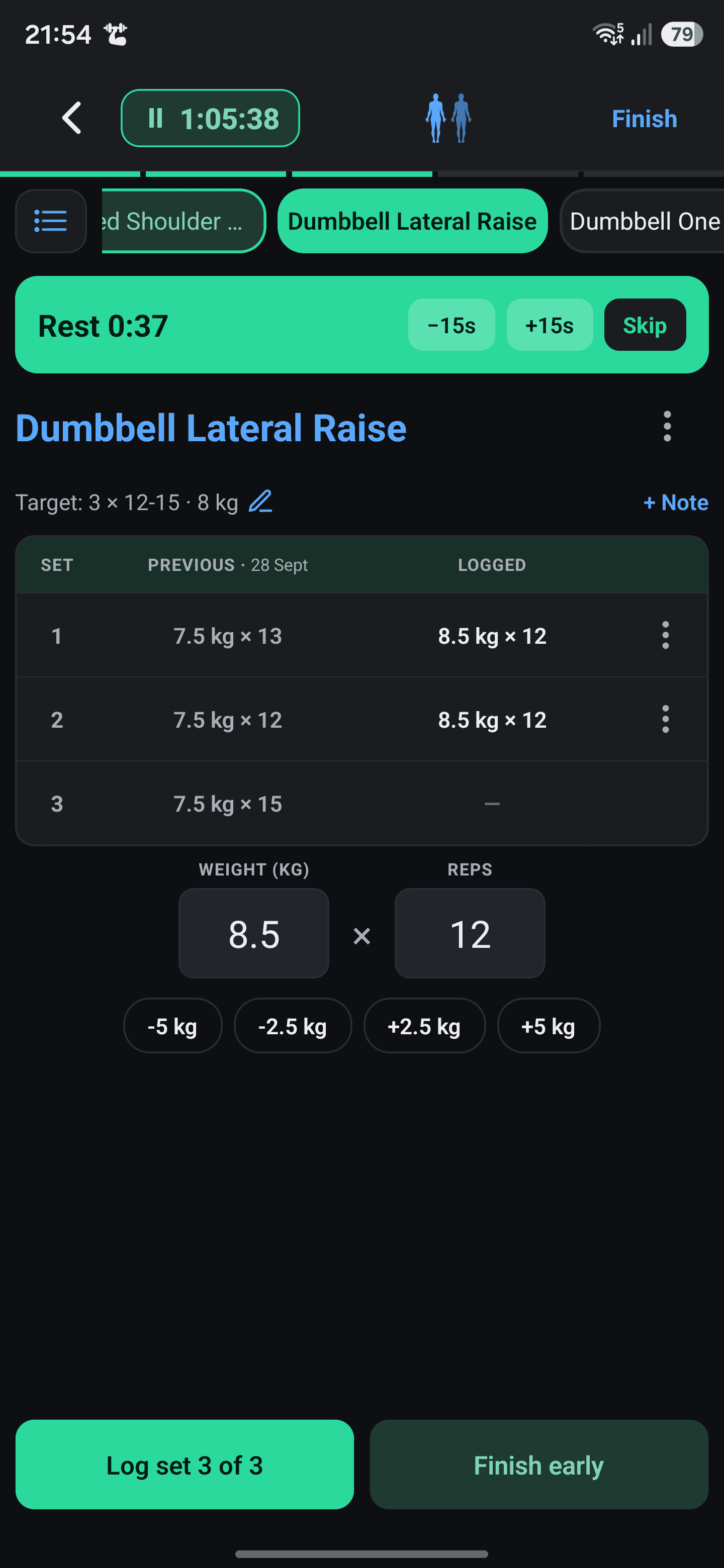
With TrrackFit Pro, Your notes on an exercise can hold reminders such as “weight per dumbbell” or a machine's seat setting. Core workout logging does not require Pro and works offline. You can also keep a convention key in a separate note alongside your log.
Build a plan and review your results
- How to Track Workouts and Measure Strength Progress explains how to review consistent entries and interpret common metrics.
- How to Build a Reusable Workout Routine shows how to organize your exercise targets separately from completed sets.
Sources
- Eleiko. IWF Weightlifting Training Bar, 15 kg. Manufacturer specifications for the example of a bar that does not weigh 20 kg.
- Life Fitness. Dual Adjustable Pulley. Manufacturer specification of a 4:1 resistance ratio.
- Life Fitness. Axiom Dual Adjustable Pulley. Manufacturer specification of a 2:1 resistance ratio.